
Our Work / Fintech · Tax
An AI Tax Assistant That Never Presses Submit
A local-first desktop app that turns a pile of tax documents into a reconciled Pakistan income tax return, guides the user through FBR's IRIS portal, and leaves Submit to them.
- 300+automated tests, including 30 synthetic taxpayer profiles
- 0portal passwords ever seen by the app or the AI
- 1 clickfrom any figure to the highlighted line in its source document
- 2languages, English and Urdu with right-to-left layout
Filing an income tax return in Pakistan is simple for someone with one employer, and hard for almost everyone else. The slab rates aren’t the hard part. The hard part is the wealth statement reconciliation, classifying income correctly (export of services or “foreign salary”? final tax or normal tax?), and remembering to claim every rupee of advance tax: car registration, token tax, phone bills, card payments abroad. A wealth statement that doesn’t reconcile is exactly what triggers a notice.
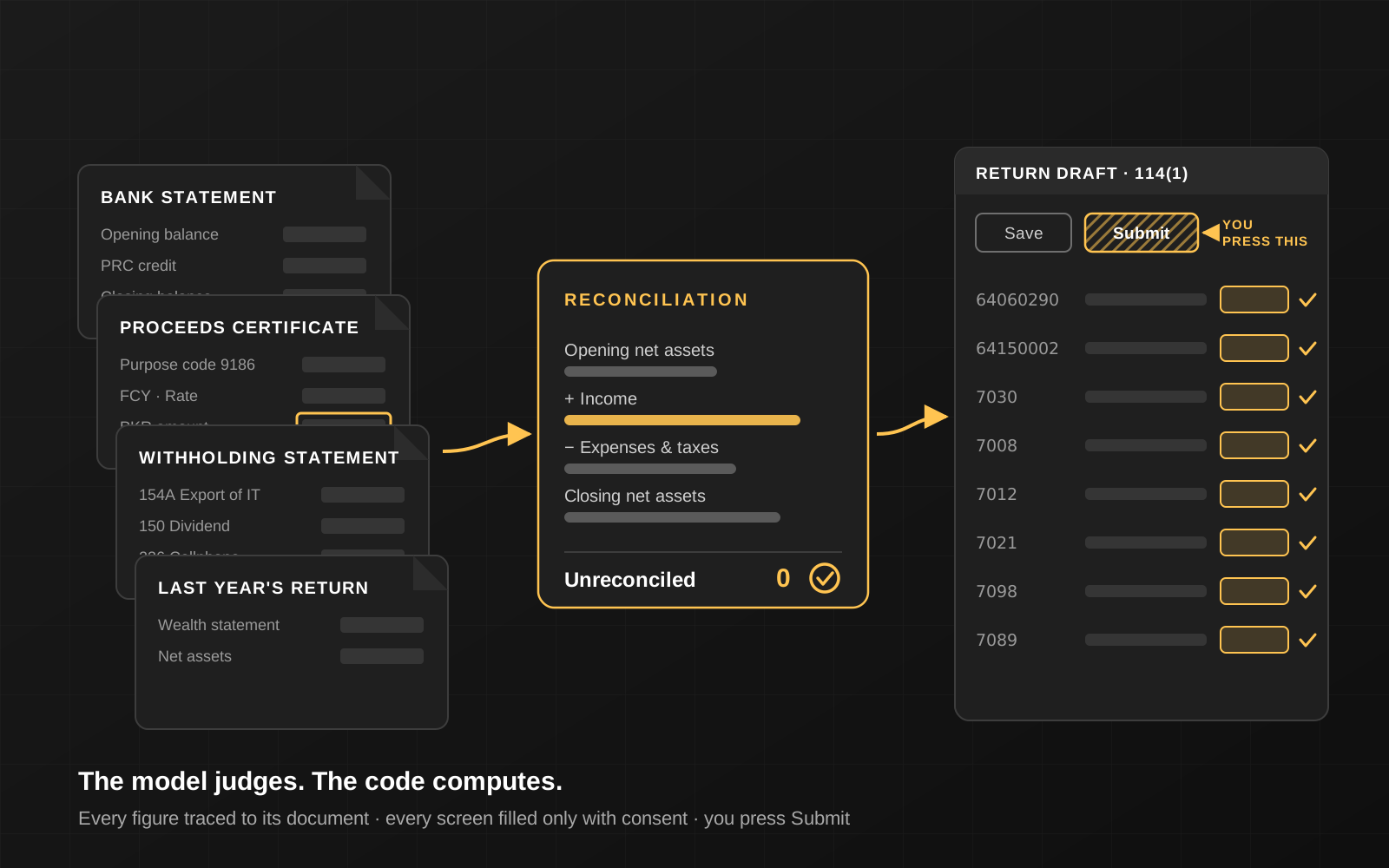
We build assistants that do the hard part properly. A taxpayer drops in their documents. An AI agent reads them, asks only the questions it can’t answer from the paperwork, and records every figure with where it found it. Deterministic code then computes the tax and a reconciliation that must come to zero. A dashboard explains every number in plain English or Urdu. Optionally, the app types the return into the taxpayer’s own draft on FBR’s IRIS portal, one screen at a time, only with their permission.
The taxpayer always logs in and presses Submit themselves. That isn’t a policy in a prompt; it is enforced in code, in four separate places.
This page describes the kind of system we build. Every engagement is custom and confidential. What stays the same is the engineering underneath.
What you get
- Document understanding with evidence. PDFs, photos and zips, including scanned and password-protected statements. Every extracted figure links back to its document and page.
- A deterministic tax engine. Slabs, surcharge, final-tax rates and IRIS codes live in a versioned rules file per tax year, signed off by a qualified reviewer, never in the AI’s head.
- A wealth reconciliation that has to balance, with a waterfall chart that shows exactly where any gap sits.
- A step-by-step IRIS guide that mirrors the portal screen by screen, with copy buttons for every code and amount.
- Optional auto-fill of the IRIS draft, with a fresh consent for every screen and a check of IRIS’s totals against the plan afterwards.
- A desktop app that keeps everything encrypted on the user’s own computer.
- A bilingual interface: English, and Urdu in a proper Nastaliq typeface with a right-to-left layout.
Architecture
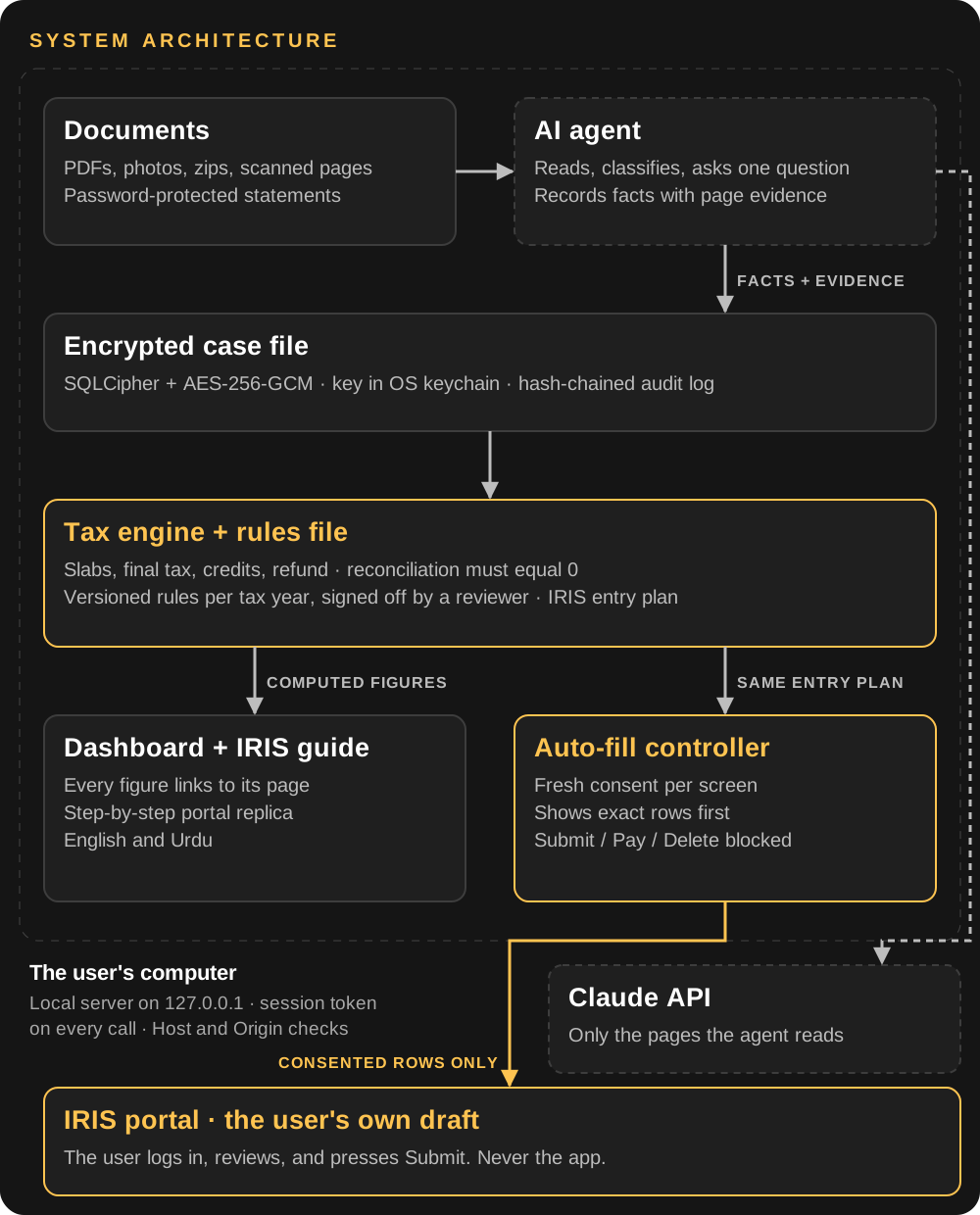
One rule shapes the whole design: the model judges, the code computes. The AI decides things like “this Payoneer credit is IT export income” or “this token tax was paid in July, so it belongs to next year”. Every number that reaches the screen or the tax portal comes from tested, deterministic code. The same entry plan drives the manual guide, the auto-fill and the final verification, so they can’t drift apart.
1. Documents in, facts with evidence out
The agent works through a fixed set of tools rather than free-form output. It lists and reads documents, renders scanned pages for vision, classifies each file, and records each fact with its source:
- Every figure carries evidence: document, page, and the exact text as printed. On the dashboard, clicking any number opens the page with that figure highlighted, found through the PDF’s own text layer.
- Password-protected bank statements are unlocked through a private prompt. The password goes straight to the decryption step, is used once and is never stored, logged or shown to the AI.
- One question at a time, with a reason. “FBR can see this Rs 734,000 deposit. If it was payment for work it’s taxed at 0.25%; if it was your own money moved between accounts, it isn’t.” Quick-answer buttons, free text, and answers the user can change later.
- Documents are treated as data, never as instructions, so text hidden inside an uploaded file can’t steer the agent.
2. A tax engine you can audit
- Rules are data. Each tax year has its own rules file: slab tables, surcharge thresholds, final-tax rates, the IRIS codes for every row, and which items are not creditable (such as capital value tax on a car). Updating for a new Finance Act is a reviewed data change, not a code change.
- Unreconciled must be zero. The engine reconciles opening wealth, income, adjustments and spending against closing wealth using the same sign convention as IRIS, so what the app shows matches what the portal will show.
- Guardrails, not guesses. The engine refuses to paper over gaps. An unexplained difference, an unanswered question, a credit dated in the wrong tax year or a 0.25% rate claimed without a PSEB registration all become blockers that must be resolved before anything is entered in IRIS.
- The AI is built to be accurate, not evasive. It helps people claim what they’re entitled to and classify income correctly, and it declines to help hide income or invent expenses.
3. A dashboard for people who have never opened IRIS
The interface is built for a first-time filer, who should always know where they are, what’s left, and why each number is what it is.
- Home: estimated refund or tax payable, tax already deducted, income by tax regime, a reconciliation gauge, a “needs you” list and a deadline countdown.
- Your money: income grouped by regime, every advance tax with its section and date, assets and liabilities at cost, expenses compared with last year and with spending visible in bank statements, and FBR’s own data side by side with the return, mismatches highlighted.
- A net-assets waterfall that walks from opening wealth through income and spending to closing wealth, with any unexplained gap shown hatched as well as coloured, so it never relies on colour alone.
- A glossary built in. “Final tax”, “adjustable tax”, “at cost”, “PRC” and the rest are explained in a tooltip the first time they appear.
- An assistant on every screen that knows which screen the user is on, with an “Explain” link on every row.
- English and Urdu, with a right-to-left layout, a Nastaliq typeface, and figures that stay left-to-right.
- Accessible by default: full keyboard navigation, visible focus, contrast of at least 4.5:1 in light and dark themes, and colour-blind-safe chart palettes checked with a validator.
4. The IRIS guide, and an auto-fill that asks first
Manual mode walks through IRIS in portal order: log in, open the return, tick the income sources, then each screen. Every step has a lightweight annotated drawing of that IRIS screen, a table of code · row · what to type with copy buttons, a plain-language “what this means”, and the common mistakes we’ve seen in real drafts. A final “Check my totals” step compares what IRIS shows with the plan and tells the user where to look if something is off.
Auto-fill mode opens a visible browser on IRIS on the user’s own machine. The user logs in themselves. Then, for each screen:
- The app shows the exact rows and amounts it is about to type.
- The user allows that one screen, or skips it. A “yes” never carries over to the next screen.
- The controller finds each row through IRIS’s own search box, types the values, and reports live: typed, or needs manual entry. It never guesses.
- It presses CALCULATE and Save, reads back the totals and compares them with the plan.
Submit, Pay and Delete are blocked in four layers: the consent gate refuses irreversible actions whatever the user answers; the browser controller checks the text and labels of every control before clicking it; the API has no route that could submit, pay or delete anything in IRIS; and the interface has no such button. Each layer has its own tests.
5. Privacy and security, local-first
Tax documents hold CNICs, bank statements and card numbers, so the default is that nothing leaves the user’s computer except the pages the AI reads to help them.
- Local server, locked down. The backend binds to 127.0.0.1 on a random port, requires a fresh session token on every HTTP and WebSocket call, and checks the Host and Origin headers, which stops other websites and DNS-rebinding attacks from talking to it.
- Encrypted at rest. Case data lives in a SQLCipher database and documents are stored as AES-256-GCM encrypted files, with one key per case derived from a master key held in the operating system’s keychain. Copying the data folder off the machine yields nothing readable.
- Masking everywhere. CNICs, IBANs and card numbers are masked in the interface, the logs and the audit trail (
35201-•••••••-7, last four digits for accounts). - A tamper-evident audit log. Every consent, tool call and IRIS action is recorded in a hash-chained log, so any edit after the fact is detectable.
- No credentials, ever. The app never asks for, sees, types or stores the IRIS password, OTP or PIN. The IRIS browser session is ephemeral and leaves no cookies on disk.
- “Delete everything”, confirmed twice, destroys the data and the key.
- A strict Content Security Policy in the desktop app: the interface can talk only to its own local backend.
6. Quality you can measure
- 300+ automated tests across security, storage, documents, the agent loop, the API and the IRIS guards, plus frontend tests.
- A regression set of 30 synthetic taxpayers: salaried, freelancers and IT exporters, investors, cars on finance, property sales and small businesses. Expected results come from an independent reference calculator written from the published rates, so every run checks the engine and the rules file against the source. It runs on every change to rules, prompts or the model.
- Security tests that prove the negative: requests without the token, with a wrong token, from another origin or with a rebound Host header are all rejected, over HTTP and WebSocket.
- Proof that files are unreadable without the key, including a check that no plaintext appears anywhere on disk.
- The agent loop is tested against a scripted model, so tool handling, interrupted turns and error paths are covered without spending on API calls.
- No real taxpayer data, anywhere. Tests, fixtures and demos use synthetic people and generated documents.
- Bugs found before users did. For example, concurrent PDF rendering and text search could crash the PDF library; it’s now serialised, with a regression test.
7. Packaging and delivery
- Desktop shell in Tauri 2, with the Python backend bundled as a sidecar binary via PyInstaller. The shell starts the backend on a random port, hands it the session token, and shuts it down when the app closes.
- The webview has no shell or file-system permissions; only the native shell can start the backend.
- CI for macOS (Apple silicon and Intel) and Windows, with code-signing and notarisation steps wired in.
- A mock mode that runs the full interface on synthetic data without a backend, ideal for design reviews and demos.
- Uses the browser the user already has (Chrome or Edge) for IRIS, so there’s no extra download.
How an engagement works
- Domain and compliance assessment. Which taxpayers, which documents, which tax years, and where the legal lines sit: who may represent a taxpayer, what the portal’s terms allow, and how personal data must be handled.
- Encode the rules. Tax rules, portal codes and screen maps become versioned, reviewable data, signed off by a qualified practitioner.
- Build the core. Document intake, the agent, the engine and the encrypted store, tested against synthetic cases from day one.
- Build the experience. Dashboard, guide and auto-fill, designed for first-time filers, bilingual and accessible.
- Harden and package. Security review, regression set, desktop packaging and signing.
- Season by season. Each June the rules change and each season the portal shifts. Updates ship as reviewed data changes with the regression set green.
An honest word
This kind of tool prepares a return; the taxpayer files it. It doesn’t replace a registered tax practitioner for notices, audits or complex business cases. It flags those for professional review. Government portals change, so auto-fill is always backed by the manual guide and never sold as guaranteed.
What we guarantee is the engineering: every number computed by tested code, traced to a document, explained in plain language, and never submitted without the taxpayer’s own hand on the button.
Nothing on this page is tax or legal advice.