
Our Work / Consumer Hardware · macOS
Battery Levels for the Wireless Accessories macOS Can't See
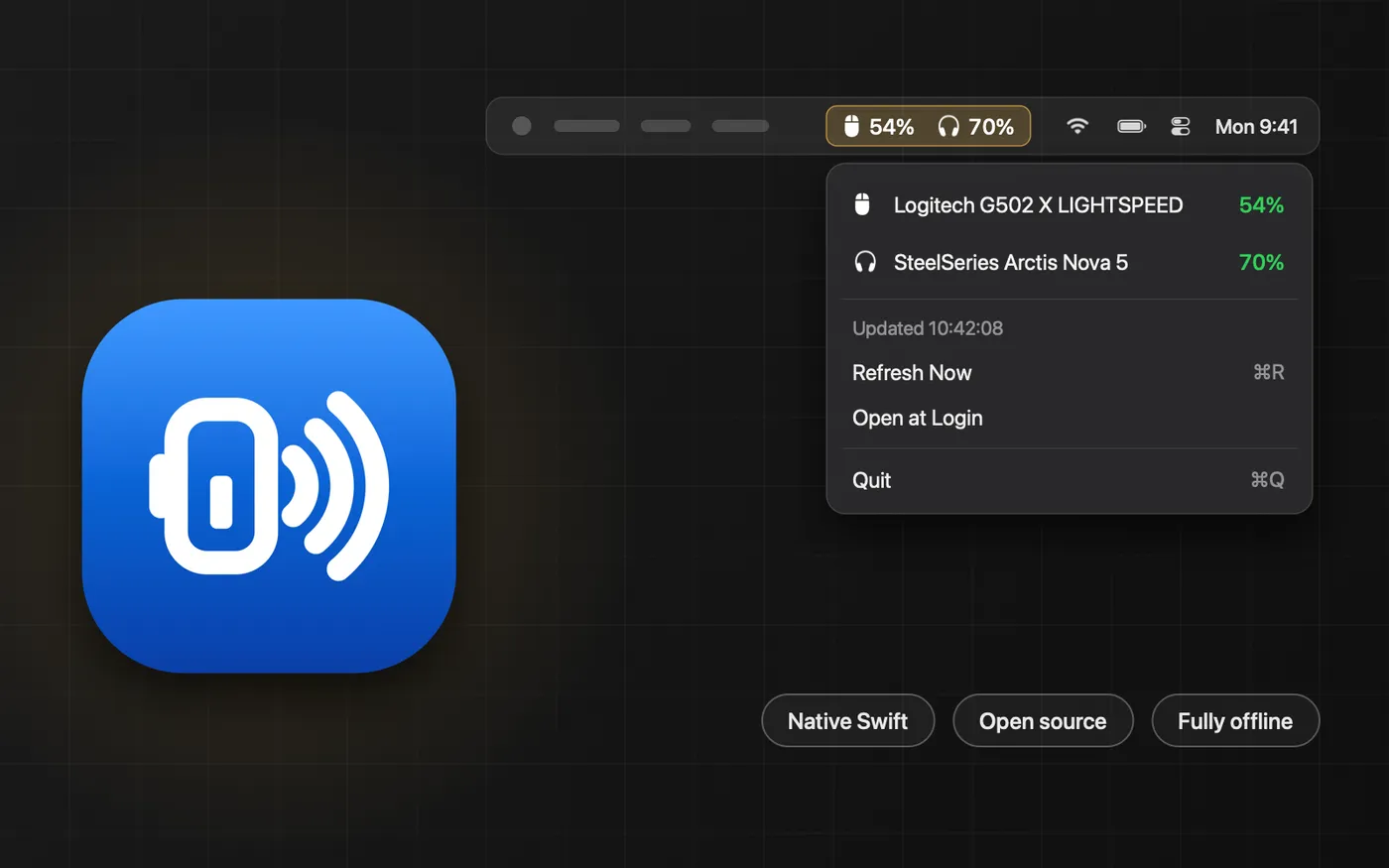
A native macOS menu bar app that reads battery levels from 2.4 GHz dongle headsets and mice by speaking each vendor's protocol. Open source, fully offline, and unable to read keystrokes.
- 4drivers: SteelSeries, Logitech, Keychron and generic HID
- 175automated checks, the critical ones mutation-tested
- 0network calls, accounts or third-party dependencies
- 0.14%average CPU while running, measured over 90 seconds
macOS shows the battery level of Bluetooth accessories. It shows nothing for the many headsets, mice and keyboards that connect through their own 2.4 GHz USB dongle, because those devices never tell the operating system how much charge they have. The usual answer is to install each manufacturer’s companion app, one per brand, each running in the background, just to find out that a headset is about to die mid-call.
We built the alternative ourselves: a small native menu bar app that reads those devices directly and shows every level in one place. It is open source, it works fully offline, and it cannot read a keystroke. This page covers how it works and what we learned making it dependable on hardware that doesn’t always behave.
What you get
- One menu bar readout. Up to three devices sit side by side in the menu bar, and when more are connected the lowest levels take the slots. The dropdown lists every device colour-coded by charge, with the time of the last reading, a manual refresh and an optional login item.
- Devices that come and go gracefully. A headset appears when it connects and drops out when it is switched off, without the menu bar flickering in between.
- A native, universal app. Swift on Apple’s own frameworks, for Apple Silicon and Intel, installed by dragging it to Applications from a disk image that carries the app’s own icon.
- A command line tool and a SwiftBar plugin, built from the same code, with JSON output for scripting.
- A read-only diagnostic mode that reports what an unsupported device is without sending it anything, so owners can report new hardware safely.
Architecture
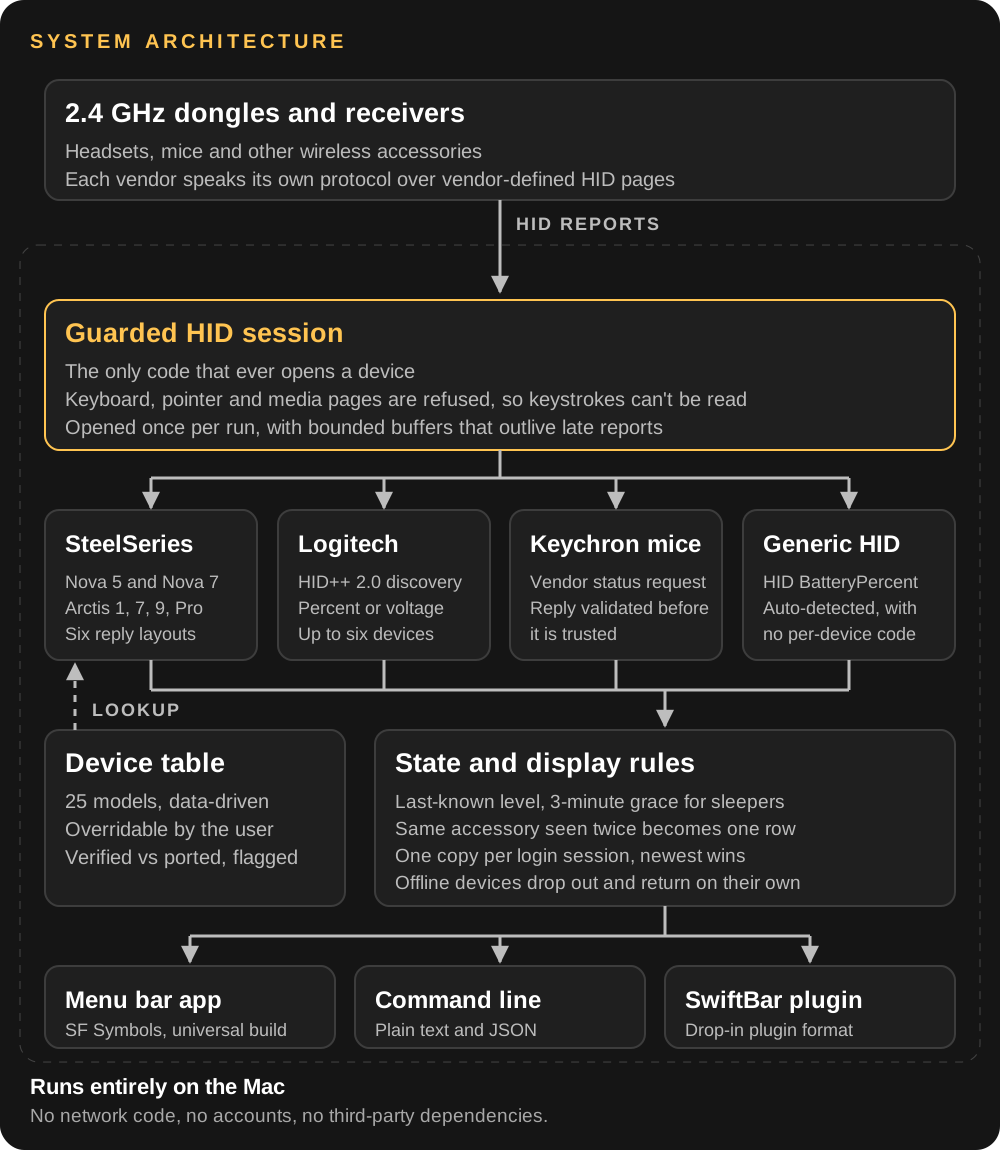
Each piece has one job. The guarded session is the only code that opens a device. Drivers turn a device’s replies into a battery level. A data-driven table says which driver handles which model, and a small set of display rules decides what is worth showing. SteelSeries and Keychron models are looked up in the table, while Logitech devices are discovered by asking the receiver what each one supports.
1. No standard to lean on
We scanned every HID collection on a Mac with these devices attached. None of them declared the standard battery usage, so there is no generic reader to write. Each vendor has its own way of answering “how much is left?”, and the differences are bigger than they sound.
- SteelSeries headsets all answer a short status request, but with six different reply layouts across the Nova 5, Nova 7, and Arctis 1, 7 and 9 families. One reports a percentage, one a step from 0 to 4, one a raw value running from 0x64 to 0x9A.
- Logitech devices speak HID++ 2.0. The app asks the receiver which features each paired device has, then which of three battery features it implements. Older gaming mice report millivolts, which a discharge curve turns into a percentage.
- Keychron mice answer a vendor status request sent as a feature report, and the reply is validated before it is trusted.
- Some hardware can’t be supported at all. One vendor’s keyboards measure their battery but have no command to report it over the dongle. We confirmed that against the firmware source and on the device, then documented it instead of shipping a guess.
Where other open-source projects had already documented a protocol, we learned from them, re-implemented the logic in our own code, and recorded each source and its license in the code.
2. When a wrong answer looks right
The dangerous bug in software like this is not a crash. It is a wrong byte offset that quietly shows a status flag as “ninety-seven percent”. We hit exactly that class of mistake in our own early work, when one headset family was assumed to share another’s reply layout. We caught it while building the device table, before anyone reported it, and designed the rest to resist it:
- Explicit parsing. Each protocol variant reads its own reply layout, and a reply that doesn’t make sense is rejected as unreadable instead of being clamped into a believable number.
- Tests that include the bad cases. 175 automated checks cover every parser with crafted reply frames, including frames that must be rejected, along with the display rules, the safety guards and the device table.
- Mutation testing. We deliberately break a byte offset, a discharge curve or a safety guard and confirm the suite fails. It caught one of our own tests that could never fail: it kept passing with the logic it was meant to protect deleted.
- A release gate. A QA script of 17 checks runs before every release: builds, compiler warnings, every output mode, JSON validity, 30 mixed runs for crashes, a memory bound, timing, a hardware smoke test, and a check that the documentation’s device table still matches the code.
3. Reliable on devices that misbehave
Wireless accessories are not well-behaved peripherals. They sleep within seconds, miss polls, and re-appear as a different device when plugged in. These are the failures we found by running the app on real hardware, and what we did about each:
- The menu bar item vanished. Mice sleep within seconds and base stations miss polls, and hiding a device on its first missed reply emptied the whole item whenever every device missed at once. The fix: unreachable devices keep their place, dimmed, for three minutes before dropping out, and the empty state carries text so it can’t be mistaken for a crash.
- Two copies after logging back in. macOS only stops a second launch of the same app path, so a login item could start a copy while the old one was still alive. The fix: the newest launch wins and ends older copies, with a tie-break so two launched at the same instant can’t terminate each other.
- The same device listed twice while charging. Plugged in over USB, an accessory can appear a second time as a separate device, with its own ID and often a plainer name. The fix: rows whose names reduce to the same product are merged, preferring a charging reading over a stale one.
- Intermittent crashes in early builds. An active mouse sends reports nobody asked for, and late ones landed in memory that was being torn down. The fix: one session per device per run, with buffers kept in a bounded ring so late reports are harmless and memory stays flat.
4. Private and safe by construction
- It cannot read your keystrokes. Keyboard, pointer and media HID pages are refused in the single function that opens devices, and a test fails if that guard is weakened. Battery data always lives on vendor pages, so refusing them costs nothing.
- Fully offline. No network code, no accounts, no analytics and no third-party dependencies. The app contains no code that opens a network connection.
- No guessing at hardware. Drivers only send commands they can name, and the diagnostic mode only reads. Sweeping through unknown commands is how devices get bricked, so the project forbids it.
- A security and licensing review. Secret scans of the code and its full history, license attributions checked against each upstream project, and a symlink-following gap in the optional device-table override file closed.
5. Shipping it
- One script builds the universal app and packages the disk image, including the icon on the image file itself.
- Every release is verified the way a user would get it: download the published file, compare its SHA-256 against the local build, and publish the checksum in the release notes.
mainis pull-request only, with force-pushes and deletions blocked, and changes go through the QA gate before they merge.- The supported-device table in the README is generated from the same table the code uses, and the QA gate fails if the two drift apart.
- Measured, not assumed. On the published build the app averaged 0.14% CPU and about 45 MB of memory over a 90-second window on an Apple Silicon Mac, doing real reads every 30 seconds.
Where it stands
The app is at version 1.2 and was first released in September 2026. The device table lists 25 models, and Logitech devices are discovered at runtime, so any that report a battery feature can be read without being listed.
We are careful about what “supported” means. The SteelSeries Arctis Nova 5 is confirmed against real hardware, and so is the Logitech Lightspeed path, tested with a G502 X. The other models are implemented from documented protocols and exercised against crafted frames, but not yet against the physical device. The app marks every model as verified or not, and the project asks owners to confirm theirs.
It is signed ad hoc rather than notarized by Apple, so macOS asks for approval the first time it opens. Notarization needs a paid developer account and is the next step before wider distribution.
What this shows we can do
- Integrate with hardware that has no public SDK: protocol discovery, safe probing and validation against the real device.
- Build native macOS utilities in Swift: menu bar apps, system frameworks and packaging.
- Test what can’t be fully tested: crafted inputs, mutation testing and hardware smoke tests when you don’t own every device.
- Release desktop software properly: universal builds, checksums, protected branches and a gate that has to pass.
Source
The code, the device table and the full history are public at github.com/usamarashid94/mac-24ghz-battery, under GPL-3.0. Releases include a universal disk image.
SteelSeries, Arctis, Logitech, Lightspeed and Keychron are trademarks of their respective owners, named only to describe which hardware this reads. This project is not affiliated with or endorsed by any of them.