
Our Work / SaaS · Business Email
Secure Business Email, From DNS to Dashboard
Shared team inboxes, website forms and newsletters on mail infrastructure the business controls: authenticated end to end, hardened, and moved across without downtime.
- Zerodowntime while moving mail to the new provider
- 3 / 3SPF, DKIM and DMARC passing on delivered mail
- 1 minsync from mailbox to shared team inbox
- 25automated tests covering the critical paths
Most small-business email is an accident. A provider picked years ago, DNS records nobody remembers adding, a shared password in a spreadsheet, and a website contact form that quietly forwards to someone’s personal inbox. It works until a lead goes missing, a customer’s reply lands in spam, or someone leaves with the only login.
We build business email the other way round. Infrastructure the business controls, authentication that proves every message is genuine, and an access model a non-technical owner can run. Inbound mail lands in shared team inboxes, the website feeds straight into them, newsletters go out on a separate path so they can never drag down support mail, and the whole stack runs on a hardened server.
This page describes the kind of email system we build for growing companies that want their mail on infrastructure they own. Every engagement is configured to the client’s domain, team and existing providers. What stays the same is the engineering underneath.
What you get
- Mailboxes on infrastructure you control, for roles and people alike, over standard IMAP, POP3 and SMTP, so any mail app on any device works.
- Shared team inboxes where customer service sees one queue, while individual mailboxes stay visible only to the people assigned to them.
- Website integration that drops every contact form submission into the support inbox, and keeps it safe even if sending is briefly down.
- Newsletter capture with compliant unsubscribe: opt-ins recorded, a personal one-click unsubscribe in every send, and bulk mail on its own sending path.
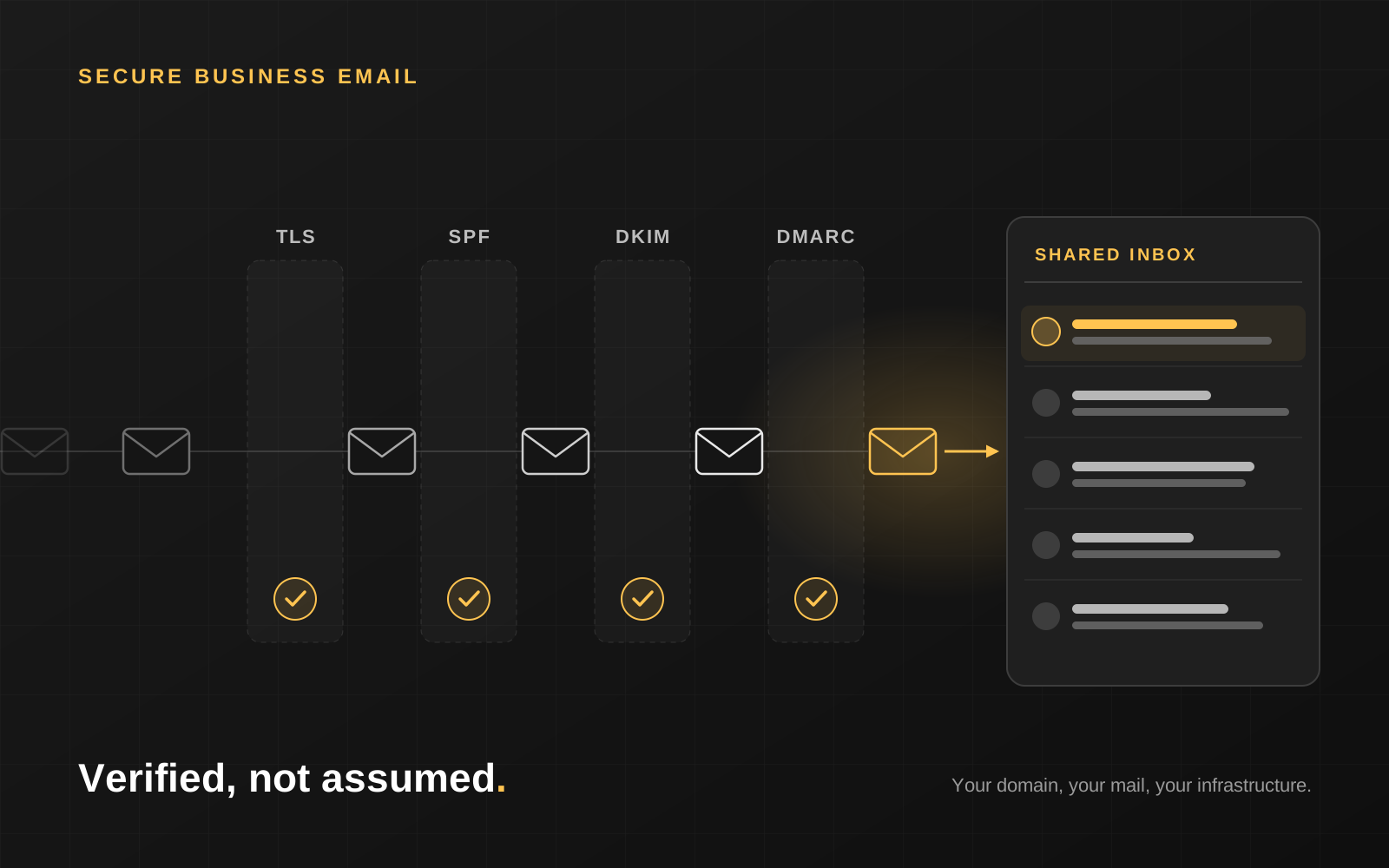
- Full sender authentication with SPF, DKIM, DMARC and Return-Path, configured and then verified on real delivered mail.
- A migration that loses nothing: the new provider brought in alongside the old one and cut over without downtime.
- A hardened server and plain-language handover: runbooks, an access guide for the team and a separate credentials document for administrators.
Architecture
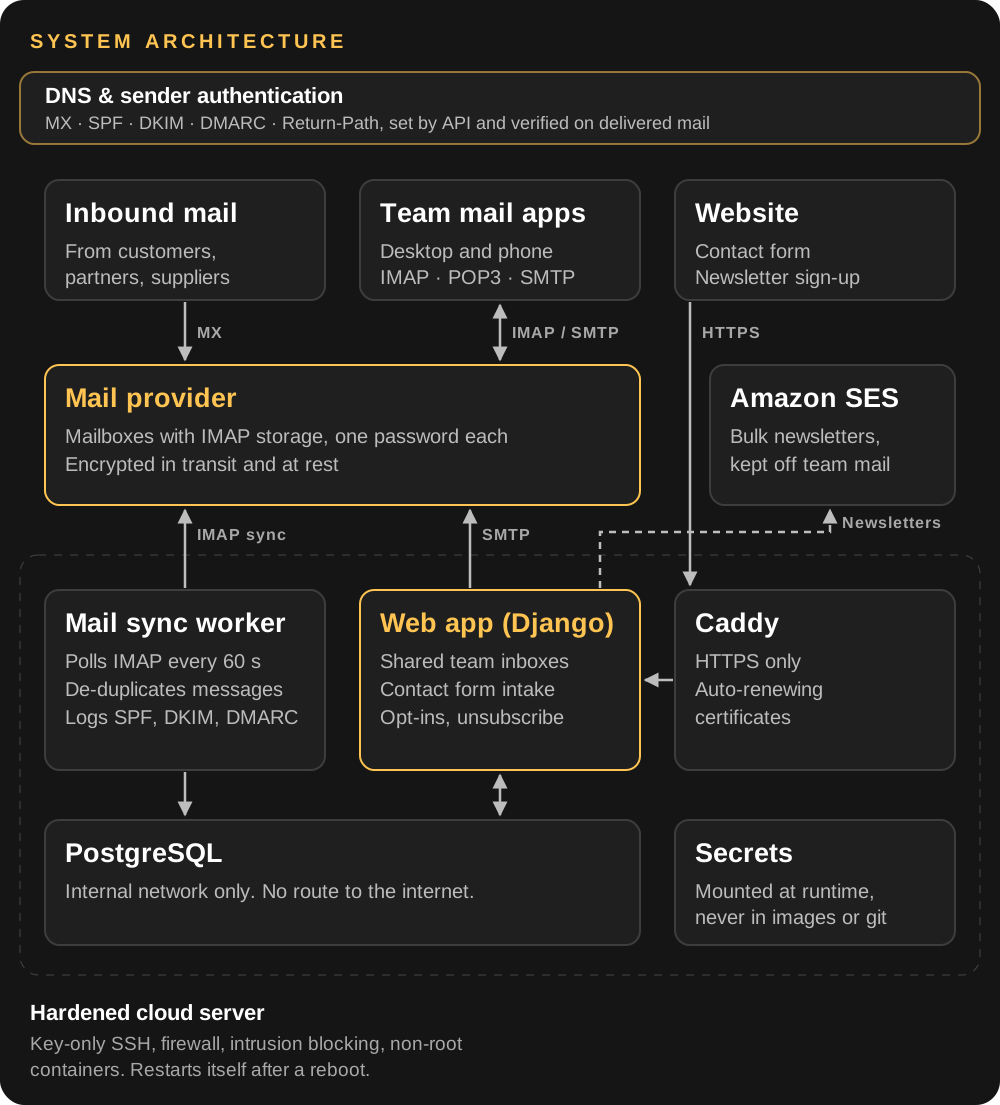
The mail itself lives with a dedicated mail provider, so storage, spam filtering and the hard parts of deliverability are handled by specialists. The application on our server reads that mail into a shared dashboard and handles everything the business adds on top: website intake, subscribers and unsubscribes. The database has no route to the internet at all, and every other component gets only the network access its job needs.
1. Authentication: proving every message is yours
Without authentication, anyone can send mail that claims to come from your domain, and receiving servers treat your genuine mail with suspicion. We set up all four layers and treat each one as unfinished until it’s proven on real mail.
- SPF lists exactly which services may send for the domain. When more than one service sends, they share one combined record: two separate SPF records is a common mistake that silently breaks both.
- DKIM signs every message cryptographically. Each sending service gets its own key, so both everyday mail and newsletters are signed.
- DMARC tells receivers what to do with mail that fails, and reports back. We start in monitoring mode and tighten towards rejection once every legitimate sender is confirmed clean, so genuine mail never bounces along the way.
- Return-Path routes bounces back to an address you control, so failed deliveries are visible instead of vanishing.
- Verified, not assumed. We send real messages and read the authentication results on the receiving side before calling any of it done.
- Changes made through the DNS provider’s API, using a narrowly scoped, short-lived, IP-restricted token. What changed, and when, is never guesswork.
2. Moving providers without losing mail
Email is the one system a business can’t take offline for a weekend. So we never switch it in one jump.
| Stage | What happens |
|---|---|
| Survey | Read the live DNS before touching anything. The providers, records and senders actually in use are often not what anyone remembers. |
| Add alongside | The new provider’s mail servers go in at a higher priority, with the old ones kept as a fallback. New mail prefers the new system, and nothing can bounce. |
| Verify | Inbound, outbound and authentication are tested on real mail, mailbox by mailbox. |
| Migrate history | Existing mail is exported from the old provider and loaded into the matching new mailboxes. |
| Retire | The old records come out, then the old account is closed, but only once the owner confirms nothing more is needed from it. |
Removing a DNS record is reversible. Closing an old mail account is not, so it always comes last and always on the owner’s sign-off.
3. Shared inboxes and the team dashboard
- One place to see what’s arrived. Mail from every team mailbox syncs into the dashboard every 60 seconds.
- Access by role. Shared inboxes such as support are visible to the whole team. Individual mailboxes are visible only to the people assigned to them.
- Authentication results kept with the mail. Where the receiving server records SPF, DKIM and DMARC results, they’re stored alongside the message, giving an audit trail of who really sent what.
- Outages delay mail, they don’t lose it. Messages are only marked as read on the server after they’re safely stored, so if the sync is ever interrupted, everything waiting is picked up intact when it resumes.
- Standard protocols stay open. People who prefer their own mail app keep using it, with exactly the same mailboxes.
4. Website forms and newsletters
- Contact form to support inbox. Each submission is saved first and emailed second, so a mail outage never costs you a lead.
- Newsletter sign-up that records opt-ins, handles people re-subscribing and rejects malformed addresses.
- A personal unsubscribe link in every newsletter, cryptographically signed so it can’t be forged or guessed to unsubscribe someone else.
- Unsubscribe takes one confirming click. Corporate link scanners open every link in an email, and a bare unsubscribe link would quietly remove people who never asked to leave.
- One message per recipient. Never one email with the whole list in the To field, a surprisingly common bug that exposes every subscriber’s address to everyone else.
- Only current subscribers are mailed. Opt-in status is checked again at send time, even if the list handed to it is out of date.
- Bulk mail on a separate service. Newsletters go through Amazon SES, so a campaign can never hurt the deliverability of your support and sales mail.
5. Security in layers
No single control has to be perfect, because every layer assumes the one in front of it might fail.
| Layer | Controls |
|---|---|
| Server | SSH by key only, password login disabled. The firewall admits SSH, HTTP and HTTPS and nothing else. Repeated failed logins are blocked automatically. |
| Network | The database sits on an internal network with no route to the internet. Background workers get outbound access only where their job requires it. The application listens on localhost only, behind the TLS proxy. |
| Web | HTTPS everywhere with HSTS and auto-renewing certificates. Secure, HTTP-only session cookies, plus protection against clickjacking and content sniffing. |
| Accounts | Lockout after five failed sign-ins. Minimum password length enforced. Every mailbox has its own password, so one leak exposes one mailbox, not all of them. |
| Public forms | Rate limited per IP address against spam and abuse. |
| Secrets | Never committed to git and never baked into container images. They’re mounted at runtime with owner-only permissions. |
6. Deployment and operations
- Containerised with Docker Compose. The web app, mail sync worker and database run as separate services, and the application code never runs as root.
- Self-recovering. After a reboot, the whole stack comes back on its own. Nobody needs to log in to restart it.
- Fewer moving parts. Static assets are compressed and fingerprinted at build time and served by the app itself, with no extra service to maintain.
- Tested where it runs. A 25-test automated suite covers contact intake, sign-up and unsubscribe, inbox access control, rate limits, login lockout and send-failure handling. It runs on the production server before sign-off, not just on a developer’s laptop.
- Safe provisioning. Mailboxes are created through the provider’s API by a script that can be re-run safely and never silently resets an existing password.
- A handover owners can use. A deployment runbook for engineers, an access guide for the team, and a separate credentials document kept away from anything that gets shared widely.
How an engagement works
- Discovery. We read your live DNS and list every mailbox, sender and provider currently in use, before changing anything.
- Design. Mailboxes and shared inboxes, who sees what, and which services are allowed to send for the domain.
- Build and harden. The server, the application, the authentication records and the security controls, with automated tests alongside.
- Cut over. The new provider goes in alongside the old one and is verified on real mail, with no downtime.
- Migrate and retire. History moves across, and the old provider is retired on your sign-off. Then the handover documents.
An honest word about deliverability
Authentication proves your mail is genuine. It doesn’t guarantee the inbox on day one. A new domain or a new sending provider has no reputation yet, and the large mail providers treat unfamiliar senders cautiously, so early messages can land in spam even with SPF, DKIM and DMARC all passing. That reputation builds with normal, steady use over the following weeks.
What we guarantee is the part that’s ours to get right: every record correct, every claim verified on real delivered mail, and nothing left to assumption.